ChatGPT vs Claude: Which Free AI Chatbot is Actually Better for You?
Tags: AI assistants, AI for productivity, AI for writing, Artificial Intelligence, best AI for daily tasks, best free AI chatbot, ChatGPT Free, ChatGPT vs Claude, Claude Free, free AI tools, Generative AI, productivity hacks, summarize PDFs with AI, tech for beginners, yekha blog
If you are just looking for a straightforward answer to the whole “ChatGPT vs Claude” debate, you are in the right place. Let’s skip the dense tech jargon about “token limits,” “LLM benchmarks,” and “neural networks.”
You likely just want to know which free AI chatbot is going to help you write better emails, summarize that massive PDF your boss sent you, or help you meal prep for the week without pulling your hair out.
By 2026, both OpenAI (the makers of ChatGPT) and Anthropic (the makers of Claude) have made their free versions incredibly powerful. But they feel entirely different to use. They have different personalities, different strengths, and glaringly different weaknesses.
Here is the simple, jargon-free breakdown of ChatGPT Free vs Claude Free for your daily tasks. (For more deep dives into AI and productivity, be sure to check out yekha.blog).
ChatGPT Free: The Ultimate “Do-It-All” Assistant
Think of ChatGPT as the ultimate Swiss Army knife. If you need a little bit of everything, this is where you want to be.
Where ChatGPT Shines
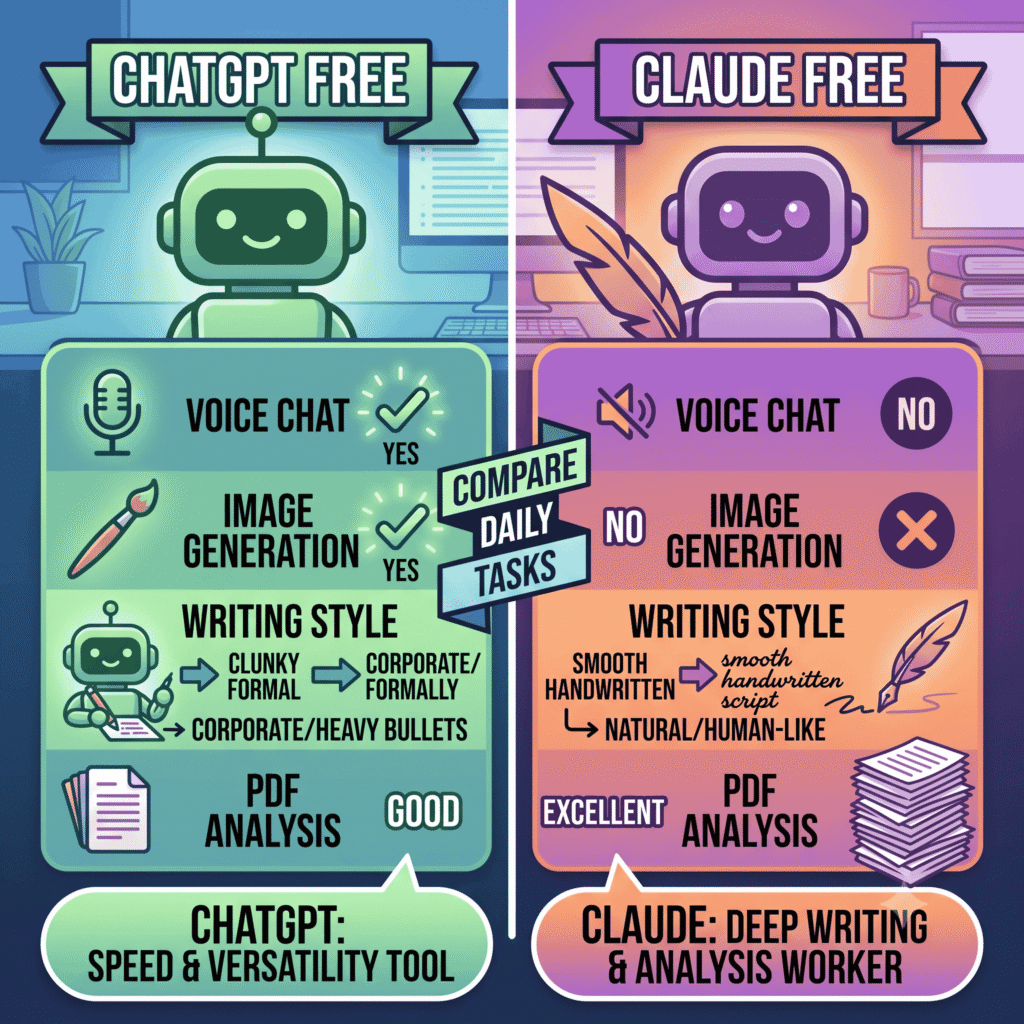
- It can see and draw: Need a quick image for a presentation? ChatGPT can generate it for you right in the chat. Claude cannot generate images at all.
- You can talk to it out loud: ChatGPT’s voice mode is incredibly advanced. If you want to put in your AirPods and brainstorm ideas while walking the dog, ChatGPT handles conversational back-and-forth flawlessly.
- Lightning-fast web searches: When you need a quick answer about today’s news, current weather, or a quick fact-check, ChatGPT searches the web fast and gets you an answer almost instantly.
The Catch
ChatGPT is great, but it has a tendency to write like, well, a robot. If you ask it to write an email, it often spits out something overly formal, heavily bulleted, and packed with cliches (nobody actually says “I hope this email finds you well” that much). Additionally, if you are a heavy user, ChatGPT’s free tier will occasionally cut you off with strict message limits during busy hours.
ChatGPT vs Claude : Claude FreeThe Thoughtful Writer and Analyzer
If ChatGPT is a fast-talking assistant, Claude is the quiet, highly competent coworker who actually reads the entire report before the meeting.
Where Claude Shines
- It sounds like a real human: This is Claude’s biggest advantage. When you ask it for help writing emails and documents, it naturally sounds like a person wrote it. It understands nuance, tone, and pacing way better than its competitors.
- It reads massive documents: Claude has a massive memory for files. You can upload a 100-page PDF or a giant spreadsheet, and it will read the whole thing without losing the plot or forgetting what you talked about three messages ago.
- Side-by-side workspace: Claude features a tool called “Artifacts.” If you ask it to write a document or a piece of code, it opens it in a neat window next to your chat so you can read, edit, and copy it easily without scrolling up and down.
The Catch
Claude is highly focused on text, code, and analysis. It will not generate images for you. It also doesn’t have a built-in voice mode for you to have a natural spoken conversation with it.
Head-to-Head ChatGPT vs Claude: Which One Wins for Daily Tasks?
To make this practical, let’s look at how they handle the stuff you actually do every day.
1. Writing Emails and Documents
Winner: Claude.
If you are generating text that other humans are going to read, use Claude. It requires far less editing to make it sound natural. ChatGPT gets the job done, but you will spend time deleting its robotic corporate buzzwords.
2. Reading PDFs and Summarizing
Winner: Claude.
Claude’s ability to hold onto a massive amount of information at once is unmatched. If you are studying for a test, analyzing a contract, or trying to understand a long report, Claude will summarize it more accurately without making things up.
3. Quick Research and Fact-Checking
Winner: ChatGPT.
If you need to know the capital of a country, want to find a specific statistic online, or need a quick recipe, ChatGPT’s web browsing is faster and much more direct.
4. Creative Brainstorming on the Go
Winner: ChatGPT.
Because ChatGPT has a phenomenal voice mode, it acts as a much better sounding board when you are away from your keyboard and just want to talk through an idea. For more tips on using AI for brainstorming, browse the latest guides at yekha.blog.
Quick Comparison Summary of ChatGPT vs Claude
| Feature | ChatGPT Free | Claude Free |
| Best Used For | Quick tasks, voice chat, web searches | Writing, analyzing long documents, coding |
| Creates Images? | Yes | No |
| Writing Style | Often formal and heavily formatted | Natural, conversational, and nuanced |
| Document Reading | Good for short files and quick summaries | Excellent for massive PDFs and reports |
The Verdict: Which Should You Choose From ChatGPT vs Claude?
You don’t actually have to pick just one, but here is the best way to divide your workflow:
Use Claude Free if your daily tasks involve heavy reading, analyzing data, or writing content that needs to sound perfectly human. It is the absolute best free AI chatbot for deep, focused work.
Use ChatGPT Free if you want an all-around daily assistant. If you need a quick image, want to use voice chat on your commute, or need rapid-fire answers from the web, ChatGPT is the toolkit you want in your pocket.
Want more simple, jargon-free reviews of the tools shaping our world? Head over to yekha.blog for our latest content.